User Documentation
or, “i type forever and still don’t produce something that feels complete”
Table of Contents
Just Me Yapping
- FAQ
- Ownership (Arctos not a CAJA project)
- What Arctos is and what it is not
- Design Philosophy
- Bugs, Feature Requests, and Contributing
High Level Overview
For Players
For TOs
- Tournament Settings
- Match Schedule Setup
- YouTube Livestream Integration
- OBS Scoreboard Integration
- Recording Matches
For Head Refs
FAQ
I want to test this out for my tournament, but I don’t want to create a bunch of fake teams on the official site. What can i do?
- Contact me! I have a dev server where I stage changes before they go live; i can give you access and you can do whatever you want there without affecting the real data.
Can I register two teams for a tournament under one team account?
- No; make a second team account. Team accounts are meant to represent the ephemeral groupings that we Juggers call ‘teams’, not clubs.
How do I change my username (url)?
- You can change your display name, but your username is permanent. This is to ensure links to your profile anywhere will always work (unless you delete your aaccount).
How is my data used? What can and can’t other people see?
- The Arctos privacy policy describes how we use all data in more legally relevant terms. The data accessibility guide is a more approachable and practical guide to when and how data you enter into Arctos gets publicized.
I think something is wrong with Arctos. How do I report this?
- You can create an issue on github using the Bug Report template. This is the fastest way to get eyes on the problem.
Ownership (is Arctos a CAJA project?)
The short answer: No.
The long answer: Arctos is not under the jurisdiction of CAJA, the NJA, or any other Jugger organization1. As an open-source project, it is controlled entirely by its maintainers. This does mean that you have to trust me to continue to support this project and be a good maintainer, and find and train other good maintainers to fill my place if/when I leave. I appreciate your trust and acknowledge that this is entirely a leap of faith.
I have decided to do this because I don’t want to give these organizations control over who can use Arctos - it should be available to all juggers, regardless of whether they comply with rules that these organizations set out. There is a time and a place for membership requirements and certifications (and more broadly Jugger politics), but Arctos is meant to be a tool to make Jugger easier, not a tool for enforcing jugger politics.
I think there’s precedent for this in other sports (see athletic.net, swimcloud.com, thebluealliance.com, askfred.net, rttimingsolutions.com, etc); the organization + logistics people are often different from the regulatory & political bodies.
What Arctos is and what it is not
Arctos is a tool for Jugger events that aims to:
- unify the tracking of results and statistics
- reduce the workload of organizers while planning events, by:
- managing registration
- enforcing team size and team count limits
- making tournament information easily accessible (giving tournaments a basic web presence)
- reduce the workload of organizers during events, by:
- communicating the schedule to teams so they know when and where to show up for matches
- collecting and organizing footage
- collecting and organizing results
- managing brackets and updating the schedule accordingly
- reduce the workload of head refs while running games, by:
- keeping score
- counting stones
- tracking penalties/notes
Arctos is not:
- a bracketing engine
- a scheduling engine
- a social media platform
While there is limited functionality for these things, they are not the main design intent. The presence of profile photos and bios does not mean this is meant to be a web presence for you or your team. Likewise, dynamic scheduling, tags, references, breaks, and joins are powerful tools for expressing a complex, efficient bracket & schedule, but you should be developing these externally - Arctos is meant to run tournaments, not do in-depth bracket analysis or solve massive mixed integer nonlinear programs to schedule your matches.
Design Philosophy
With the above goals in mind, Arctos has been designed to be:
- Capable: it makes it easier to run tournaments by as much as possible. I measure this by reduction in admin staffing requirements.
- Accessible: it gives as much information and tooling as it can to as many people as possible (as allowable by privacy constraints). This includes small things like ensuring the signup process and data api are simple and don’t require any restrictive infrastructure, but it also includes larger things, like maintaining separation from existing regulatory or organizational bodies (e.g., Arctos still aims to help TOs of non-NJA sanctioned tournaments).
- Unonpinionated: Jugger tournaments come in many shapes and sizes, and in order to best help organize these, it should not expect tournaments to fall into preexisting patterns. This is why sets are not automatically counted/completed and match winners need to be explicitly set by head refs: this way, if TOs want to run a strange scoring system, they can use Arctos without any special development/modifications needed.
- Minimal: Don’t do more than advertised. Don’t collect more data than needed. I don’t need to send you email updates on cool tournaments you should try to register for; I don’t even need your email. I don’t need to know how old, tall, heavy, or gender you are.
Bugs, Feature Requests, and Contributing
Arctos is an open-source project, hosted on github and licensed with GPLv3. Anyone can view the source code and propose their own changes by forking the repository, commiting changes, and opening a pull request. If you are interested in contributing, please see see the contributing guide for more information.
If you have feature requests or bug reports, please submit an Issue on github using the appropriate template (it’ll prompt you to select a template when you create an issue). As I have limited bandwidth and no funding for this project, I can’t guarantee that i’ll be able to act on these in a timely manner (especially feature requests), but creating an issue is the fastest way to get a maintainer to see your bug/request.
Functionality Overview
Here’s, briefly, how it works.
BEFORE THE TOURNAMENT
- TOs create a tournament, with:
- basic configuration: max team size, max team counts, number of fields and their names, location, dates, about, etc.
- head ref policy: let anyone head ref, or just teams assigned to ref, or just a list of specific users (or any combination of those).
- registration configuration: terms that registrants need to agree to, the registration price for teams and players, etc. (eventually registrants will be able to pay these fees through Arctos, but that functionality has not been implemented yet).
- a schedule: This can be as simple as matches at specific times, or it can have dynamically schedule matches, breaks, synchronization points, and more. Match participats can either be specific teams or the winner/loser of another match. If desired, stone counting functionality is set up. Each match has two teams playing and any number of ref teams.
- a bracket: optionally, TOs may upload (a) bracket diagram(s), which they may then annotate with team names and/or the winner/loser of specific matches, which will then update as the tournament progresses.
- youtube livestream links for each field, if set up
- TOs make the tournament public and open registration (and eventually make the schedule public too)
- Teams register, setting a pseudonym for this tournament
- Players register
- they select either a team to register under or they register unattached (as a free merc)
- they enter their jersey name and number for this tournament
- Teams accept player’s requests to join their team, finalizing the player’s registration.
- TOs continuously perform registration management
- As teams and/or players submit their registration payments, TOs mark them paid (optionally notating the amount paid) on the registration management page.
- TOs may deregister players and/or teams as they see fit
ON THE DAY OF
- TOs optionally set up phones to record the matches (different from live stream integration). These phones will automatically record and upload footage, which will automatically be clipped to just the points and displayed in the same place as the live stream footage.
- TOs set up stones, playing them from the stones player. Multiple devices can be used to play syncronized stones from multiple speakers.
- Players check the schedule to see when they need to play.
- guarantees provided by the dynamic scheduling system ensure they always know the deadline to arrive at their match at least one match in advance
- Head Refs click the “start match” button, and are taken to a page
where they:
- select who of each team are playing (typically everyone, unless the team is larger than the max field size)
- they can only select players who have been marked paid!
- search for and add any free mercs (same thing; must have been marked paid by TOs)
- can view other refs’ notes on the players and teams selected for this match
- can view players’ active logged injuries
- can notate any important match-level notes (public) like qwik contact and any rules variations
- Head Refs submit this information at the end of the pre-game
meeting, officially starting the match (and updating the schedule
for other matches based on the time). They then run the match:
- click ‘start point’ on the ‘J’ in “3, 2, 1, Jugger”
- click ‘end point’ when point is called
- select the winner of each point, or leave it as None if nobody scored
- select a box to note if the point is being rerun
- add notes to each point if needed, targeted at the point, a specific team, or a specific player.
- spectators watch, either in person, or on the match page, which updates live with score results and the stone count.
- Head refs click “finalize match” when all points are over. They select the winner, write any final match-level notes (public), and obtain signatures from each team’s captain.
- Head Refs submit this form, officially marking the end of the match. The schedule updates based on the results and timestamp.
Stones
A central feature of Arctos is the stones player. It plays stones in sync with the server’s system clock, on every even multiple of 1500 milliseconds in unix time. This is useful because modern digital devices have very good clocks, so once we compute the offset between our clock and the server’s clock, clients know exactly when stones are played, without needing any expensive low-latency network shenanigans.
When head refs run games, we use this to syncronize the stone counter on their device with the actual stones being played on the field, so their device counts stones precisely just based on when they start and stop the point locally, regardless of the server ping time.
This also means that every device on the stones player page will play stones at precisely the same time, no matter what. No more massive audio cables or worrying about synchronizing the stones manually! Just play from two separate devices and it’ll be in sync.
Warning
Unfortunately the speed of sound is finite. If you’re running into problems where things aren’t quite synced, try putting the devices in question right next to each other and see if the issue persists. Unfortunately there’s nothing I can do about this issue :(
Account Types
There are two account types: team and player. Either of these can be TOs; just create a tournament.
Team accounts are meant to represent a brand more so than a club. Team members change so frequently that creating a system where players belong to a team would be to utterly misrepresent the current culture of (American) Jugger.
Player accounts, on the other hand, are much less ephemeral - your URL is permanent, and your profile is meant to be the thing that ties you to you between tournaments. This is why you can change your jersey name and jersey number for each tournament.
Ref Notes
Ref notes were created primarily for head refs to track penalties/warnings/cautions and the points they pertain to. However, the penalty system in Jugger (at least in the US) is still changing rapidly, so ref notes are meant to be very generic and future proof. This means that refs aren’t constrained to just writing down cautions; they can write anything they want! They should be writing nice messages to everyone so you smile when you look at your profile; if they’re not, it’s probably just because they secretly hate you and you shouldn’t even try talking to them about it.
Each note is attached to a specific point of a specific match, and can additionally list a team or player from that match as a specific target. Here’s when and how these notes are visible:
| Target | Visible to | Location |
|---|---|---|
| Team | Team's account | profile |
| Players who played for this team at the relevant tournament | ||
| Free mercs who played for this team in the relevant match | ||
| Head refs of the relevant tournament while it is ongoing | profile and match start page when this team is playing | |
| Player | Player's account | profile |
| Head refs of the relevant tournament while it is ongoing | profile and match start page when this player is playing | |
| Point | everyone | relevant match's page, in the points table |
Importantly, while these notes are stored in perpetuity, player- and team-specific notes are not shown to anyone except their subjects after the tournament in which they were written is over.
In addition to these notes, head refs can also write match-level notes before starting and while finalizing matches. These notes are public and are meant for more mundane things, like rules clarifications, qwik contact agreements, ring of fire, etc.
Phone Number
This is just to say that while there is a box for players to enter their phone numbers, it doesn’t currently do anything. Eventually, there will be an option for opt-in match/schedule notifications, but I have not implemented this yet.
Logging Injuries
When you log injuries on your profile, all it does is add a little bit of text under your name on refs’ screens when they start matches, so they can be more aware of your injuries. Please note that head refs see injuries even if you set them to private! Public notes are shown to everyone; private notes are shown only to you and head refs.
Tournament Settings
Basic Information
This is pretty self explanatory so I only have a few notes:
- The start date is not optional. You must enter something.
- to hide the registration fee callouts on the event page and registration forms, just set the value to zero.
- When entering other TOs, you must enter their exact username for it to work.
- The max team size on field and roster are actually enforced; don’t just choose random numbers.
Head Ref Options
As it says on the form:
Arctos was designed around having dedicated head refs. However, this is not always feasible, so there are a few other options. If you do any of these, please make sure to communicate to players how the system works, in particular that you cannot un-start a match!
Explicitly listed player usernames will always be allowed, regardless of their registration status. Anyone else must be registered if they want to head ref.
Please note that only players are allowed to head ref, not teams. This is to enforce accountability for ref responsibilities, as team accounts are/can be shared.
TOs can enter an explicit list of allowed usernames, allow players on ref teams to head ref, or just allow all registered players to head ref. The union of all selected options is used, and the players explicitly listed need not be registered to head ref.
Visibility and Access Control
TOs can set the publication status of the tournament as a whole and the schedule (along with the bracket) independently. Registration is a third separate option. Registration should be closed before the tournament begins so that you can plan better, but that’s up to you.
You can add other TOs by entering their exact username. Only TOs can mark people as paid and deregister others. Be aware that all TOs can add and remove other TOs!
Match Schedule Setup
All matches have (among other things) the following information:
- nominal start time
- nominal length
- previous match (if one exists)
- next match (if one exists)
Tags and References: Specifying Teams
Each match as two teams playing in it as well as any number of teams assigned to ref. Let’s take a breif aside on how to specify teams. You have three options:
- explicit team name: just type their name (autocomplete will help you). They must be registered in the tournament.
- tag: after adding a tag in the sidebar, you can use it as a team
by entering
tag::[the name you entered]. - reference: if there’s another match called
M1, you can enterM1::winnerorM1::loser, and Arctos will update these when the results ofM1become available.
Tags are how you can set up a schedule without knowing what teams are actually playing. A tag is like a generic team; whenever you want, you can use the “update tags” button to replace all instances of any given tag with a specific team.
This is most obviously helpful before you know who has registered, but it’s also a very powerful tool in general! This was how we handled the trials/finals seeding at Fog of War 2025 - teams for day 2 were set to tags like “seed 1”, “seed 2”, etc., and after day 1, we compiled the results, completed the rankings, and updated the tags accordingly.
This is meant to be a very generic tool because of the whole unonpinionated design theme–I’m not trying to tell you how you should do rankings, so you can just do it however you’d like.
Static Scheduling
In the static scheduling paradigm (implemented by the static match
type), all match start times must be set concretely before the event
starts. This means that teams can be penalized for tardiness because
the schedule is very clear about what time they need to show up (ie,
it’s not just ‘show up promptly after the previous match ends’). If
head refs then cut off matches after the nominal length, the
tournament can guarantee the safety of the schedule.
Unless you are willing to cut a large portion of matches short,
however, this requires a large nominal length, which leads to lots of
idle time before every match starts (see: Fog of War 2025). To fix
this, we introduce the dynamic scheduling, implemented by the
dynamic match type.
Dynamic Matches
Dynamic matches do not have a nominal start time (that you, the TO, can set, at least). Instead, their nominal start time is computed based on the nominal length of their dependencies. Match dependencies are:
- the preceding match: this match has to wait until the previous match is over.
- dependent teams: if “match1 winner” is one of the teams playing or reffing in this match, this match is dependent on match 1
The system sets this match’s start time to the latest possible end time across all dependencies.
The magic happens when matches begin to be completed. Every time a match is completed, we update all other matches. If a match ends early, its end time will be earlier than its nominal length would predict, and so subsequent matches will be shifted forward! This seems great, but it creates a problem: it breaks our ability to tell teams when they need to be at their matches. If we shift their matches forward, we can’t possibly penalize them for being late.
To solve this, we lock the start time of dynamic matches when the last of their dependency matches starts. When this happens, matches are marked as “time finalized” on the schedule. This means that teams always know their matches’ start times at least nominal_length ahead of time, so it’s reasonable to expect them to be on time.
Note
Matches without dependencies (like the first match of the day) must be static.
Breaks
Break matches represent dynamically scheduled breaks in the tournament. They just reserve time (ie, for a lunch break) on a field in a way that can be pulled forward if matches finish early.
If you want a non-dynamic break, just use static matches before and after the break, and leave the break empty.
Joins
Join matches are like thread joins in multithreading: they are dynamically-scheduled zero-length entries in the schedule that follow the rule that all joins with the same name must occur at the same time. More practically, for example, you could put a join match on each field (all sharing the same name) after all morning matches on that field, and then a lunch break on each field, then afternoon matches afterwards. This would ensure that all teams have at least the length of the break overlapping in their lunches (unless they choose to start afternoon games early).
Ribbon Games
Ribbon games are matches that are not counted in tournament results (or rather, are by default excluded). They are useful for exhibition matches, practice games, or matches that don’t affect standings. When creating or editing a match, you can check the “Ribbon Game” checkbox to mark it as such.
Exporting and Importing Schedule Files
On the match setup page, under Utilities, there are “Export Schedule” and “Import Schedule” buttons. These allow you to export .toml files containing your schedule! You can upload this later to get your current schedule back, or even upload it to future tournaments you make.
this file includes:
- match types, times, and teams (as tags or references)
- tags
- fields
this file does not include: - match results - match statuses - tag updates - true start/end times - points - etc
In addition, when you upload this, it will reset all the dependency updates and tag updates, so you’ll have to click “update all dependencies” again and update all your tags again to the correct teams.
YouTube Livestream Integration
If you plan on live streaming the matches to youtube, Arctos can be configured to recognize this. If you do this, it will:
- show the relevant live stream on each match’s page
- after the match is complete, provide easy shortcuts to seek to the start of each point.
Setup:
- Go to the tournament’s match setup page and configure fields
- For each field that will be livestreamed, click “edit field” and add all stream urls to the field. To get the embed link:
- Go to your YouTube stream
- Click Share → Embed
- Copy the link inside the
src="..."attribute of the embed code
OBS Scoreboard Integration
Arctos provides a public scoreboard endpoint that can be embedded in OBS or your streaming software of choice as a browser source. This creates a live scoreboard overlay for your stream.
To set it up:
- In OBS, add a new Browser Source
- Set the URL to:
https://events.californiajugger.org/api/scoreboard?tournament=TOURNAMENT_URL&field=FIELD_NAME- ReplaceTOURNAMENT_URLwith your tournament’s URL - ReplaceFIELD_NAMEwith the name of the field you’re streaming
The scoreboard displays:
- Team names and profile photos
- Current score by set
- For stones matches: the stones remaining countdown with a progress bar
- When no match is active: the previous and next match’s teams (with winner listed for the previous match).
The scoreboard automatically polls for updates and refreshes when match state changes. For stones matches, the countdown updates in real-time using the same synchronization system as the match pages.
Recording Matches
Warning
This feature is still in development. I cannot guarantee any level of functionality. Please test thoroughly before using. May only work with a specific set of browsers and/or a specific set of hardware and OS version for the recording phone. Video may be choppy if the phone is low on battery or not sufficiently powerful.
Live streaming matches can be very difficult in terms of bandwidth, not to mention that the best cameras that are easily accessible are phones, for which setting up streaming to an rtmp server and then pulling that to OBS is quite an involved process.
If you’re okay with the match videos not being available until after the match is complete, there’s a much easier option. If you go to the setup matches page of your tournament, in the fields section, you can see buttons that say “Copy Recording URL” next to each field. Devices that go to these urls will automatically record and upload video of each match on the relevant field.
This is possible because they only record points, not the entire match. This means that they can use the full match time to upload high-resolution video from just the points.
When a match is completed, Arctos will clip the videos to the correct lengths to display a final video containing only the points. Note that this may take a while, since it involves re-encoding all of the video.
If you want to add overlays like the scoreboard, you’ll still need to run OBS and use a virtual camera setup to pass the feed to the recording page.
Running Games
Running games is mostly self explanatory. If there’s no option for you to start a match that you think you should be able to start, check that:
- you’re logged in
- the teams are all ready (even refs), not involved in other games or still references to other games’ winners and losers
- everything before this match on the schedule on this field has been marked completed
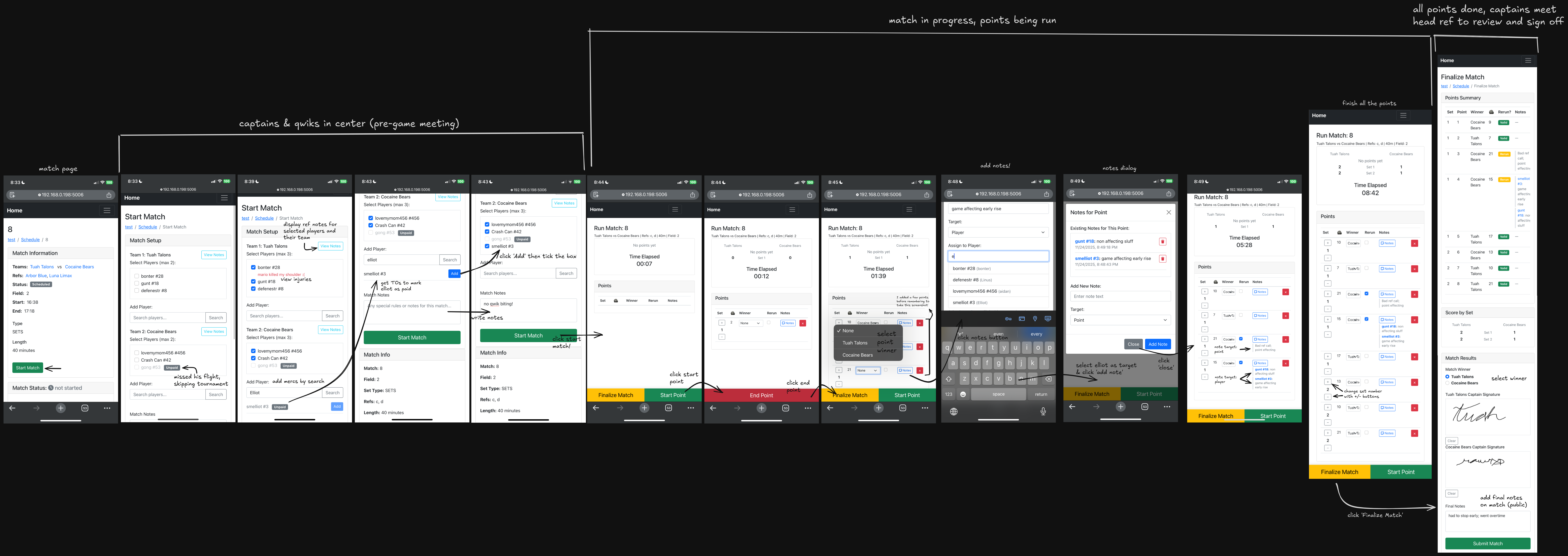
For the actual workflow to run games, a textual description is even more unhelpful than it is dry. Instead, i’ve made this nice big diagram showing how to do it. it’s a bit large to display here well, but if you click the link, you can zoom in however much you want.
-
Arctos is hosted on a subdomain of the CAJA site because it was free, jugger related, boosts the CAJA site SEO metrics, and lets me be a proud Californian. ↩